


Untangled App is a web application designed for Ecuadorian entrepreneurs, offering affordable access to expert legal advice, a legal document creator, a centralized management hub, and updates on business regulations.

The reasons Behind
👩🏻⚖️ Entrepreneurs often struggle to find reliable and affordable legal services to navigate the legal framework and protect their interests and businesses effectively.
📱Untangled was developed to address these challenges, by providing entrepreneurs with cost-effective, trustworthy legal advice directly through an easy-to-use app.
 If it becomes a reality, it would be a dream for entrepreneurs.
👌🏼
If it becomes a reality, it would be a dream for entrepreneurs.
👌🏼
UX Designer, in collaboration with legal experts and entrepreneurs. Part of my UX certification in Berlin.
3 Months (May to July 2023).
Figma, Miro, Trello, Canva, Optimal Workshop, Helio and Survey Monkey.
The Design Process
The approach uses design thinking to understand human experiences.
Tap the Buttons to Explore Each Stage:
Empathize: Understanding Legal Tech Needs for Entrepreneurs
The very first step was to deeply understand the problems faced by entrepreneurs when seeking legal advice.
Quantitative surveys and qualitative interviews were conducted to deeply understand the needs and behaviors of a diverse range of Ecuadorian entrepreneurs aged 28 to 54 in the legal technology sector.

Surveys: Quick surveys gathered essential data on legal service usage and user satisfaction.
Interviews: Five targeted interviews with entrepreneurs revealed in-depth user experiences and expectations.
Competitive Analysis: Evaluated leading legal tech apps (in the US due to lack of competitors) to spot trends and opportunities for differentiation.
The specific objectives of the research were:
Identify entrepreneurs' steps when seeking legal advice.
Understand their most common legal requirements and pain points.
Uncover difficulties in obtaining legal advice.
Explore optimal solutions for these needs and frustrations.
What Entrepreneurs Say?
Francisca
Entrepreneur, 33 years

"The thought of having to look for a lawyer makes me nervous. They are not cheap. I have no idea when there are regulatory changes that affect my business."
Jaime
Entrepreneur, 28 years
"If I use a legal app, all confidential information must be safe. It is essential for my business."
Paula
Entrepreneur, 31 years
"I have needed a lawyer since I graduated from university, but I can not always afford it."
Oriana
Entrepreneur, 29 years
"Waiting and begging for service from lawyers is exhausting."
Key Findings

Behaviors
- Entrepreneurs often rely on personal networks for legal advice.
- Limited use of legal apps.
- Reliance on accountants for tax-related legal obligations.
Facts
- Reliance on non-profits or family for legal help.
- Desire for comprehensive legal information.
- Interest in digital services - legal apps.
- Interest in user-friendly resources such as legal apps or social media for regulatory updates.
- Willingness to pay for quality legal services.
- Limited knowledge of regulatory changes affecting business.
Frustrations
- Exhaustion from seeking legal services and high costs.
- Anxiety and nervousness when looking for a lawyer.
- Uncertainty about compliance with legal obligations.
- Frustrated by the lack of transparency regarding costs and fees of legal services.
Needs
- Accessible and affordable legal services several times a year.
- Clear instructions and procedures.
- Updated information on regulatory changes.
- Legal help, especially with taxes, labor, and intellectual property.
- Common legal docs needs include: Standard contracts, notarizations, affidavits, deeds, and protecting intellectual property.
- Clear payment methods and various payment options.
- Friendly legal experience and prompt customer service.

DEFINE: Personas, User Journey and User Flow Development
To show the results of my research and keep them as the central axis of the design, I came up with two personas: Pamela and Sebastian. Let me introduce these characters in more detail:
Persona 1: Sebastian
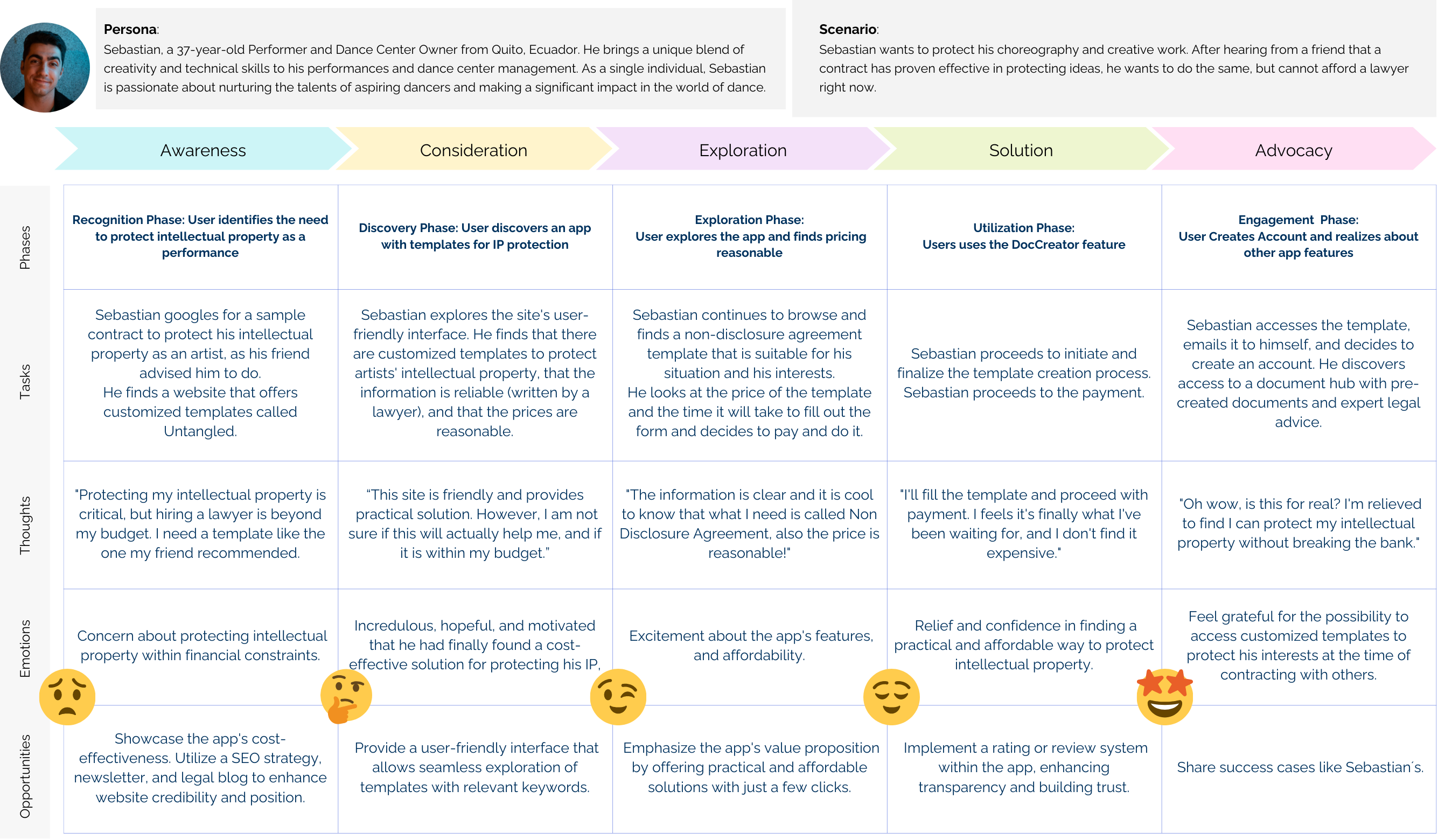
Sebastian, a dance center owner in Quito, seeks efficient legal solutions to focus on his passion for dance and his artistic community.

Persona 2: Pamela
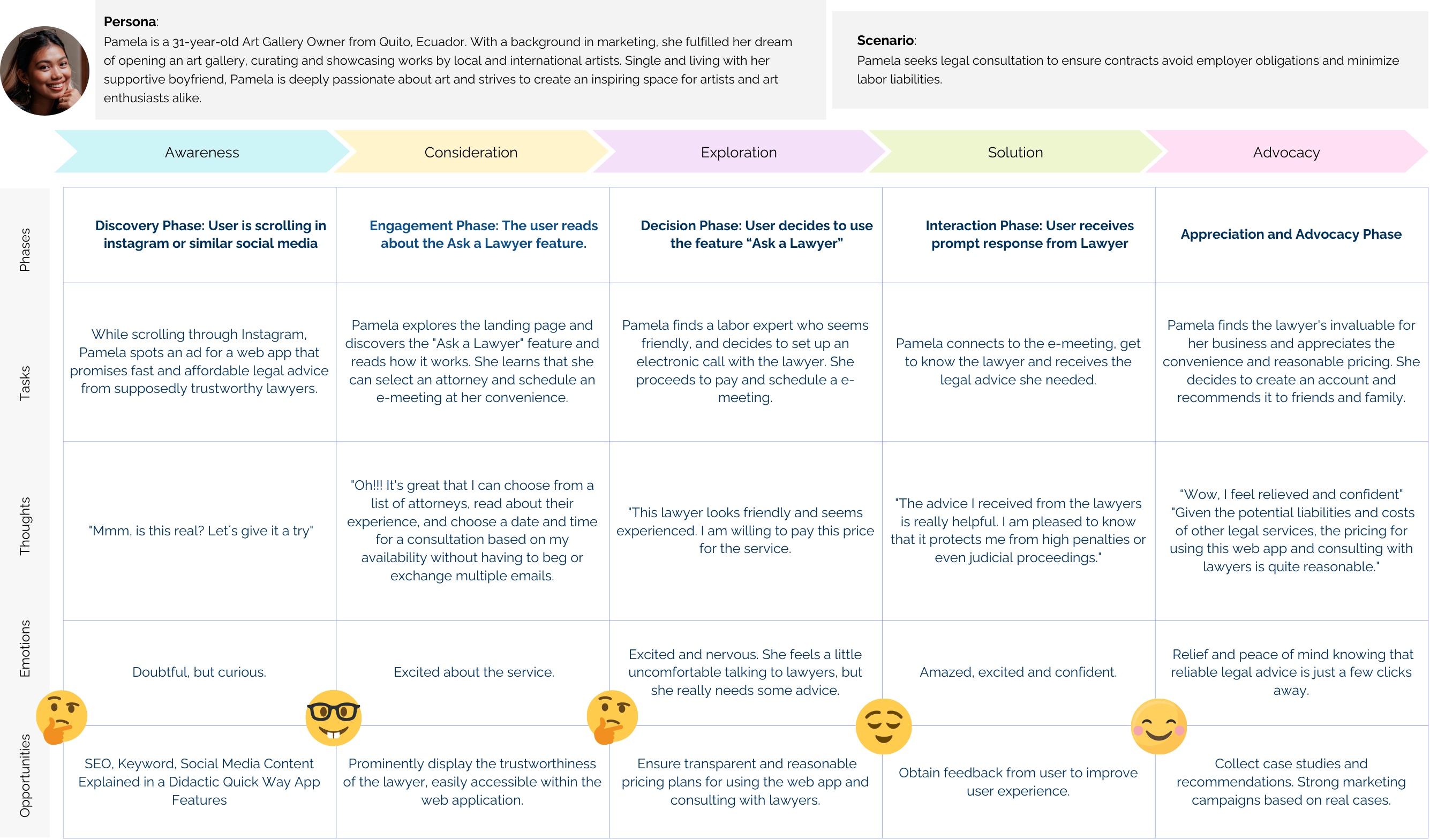
Pamela, an art gallery owner from Quito, seeks affordable, reliable legal resources to protect her business and support her creative and social pursuits.

User Journeys and User Flows
To put myself in the shoes of Pamela and Sebatian, I used user journey maps and user flows to better understand their experience using Untangled, legal app. Take a look to a few examples!
User Journey Sebastian
User Journey Pamela
Ideating and Designing Solutions for Entrepreneurs
Ideation
During the Ideation Phase, I delved into creative brainstorming sessions to tackle the design challenge at hand. This led to the development of a Sitemap, serving as the blueprint for the web application's structure.
Refining the site map was a process guided by the results of the Card Sorting exercises.
Card Sorting
- Methodology: Open card sorting.
- Participants: 9
- Number of cards: 20
- Main Categories: Based on current research, key features will include lawyer consultations, document templates, reminders, regulation updates, and in-app payments.
Key Findings
Participants struggled with legal terminology, highlighting the necessity of a robust onboarding process.
User confusion due to the complexity of legal services should be addressed through a Q&A section with FAQs and in-app customer support.
Changes include removing "My Legal Documents" and "My Lawyer Responses" from the "My Profile" section and simplifying processes by eliminating certain cards.
Design: Creating wireframes and prototypes
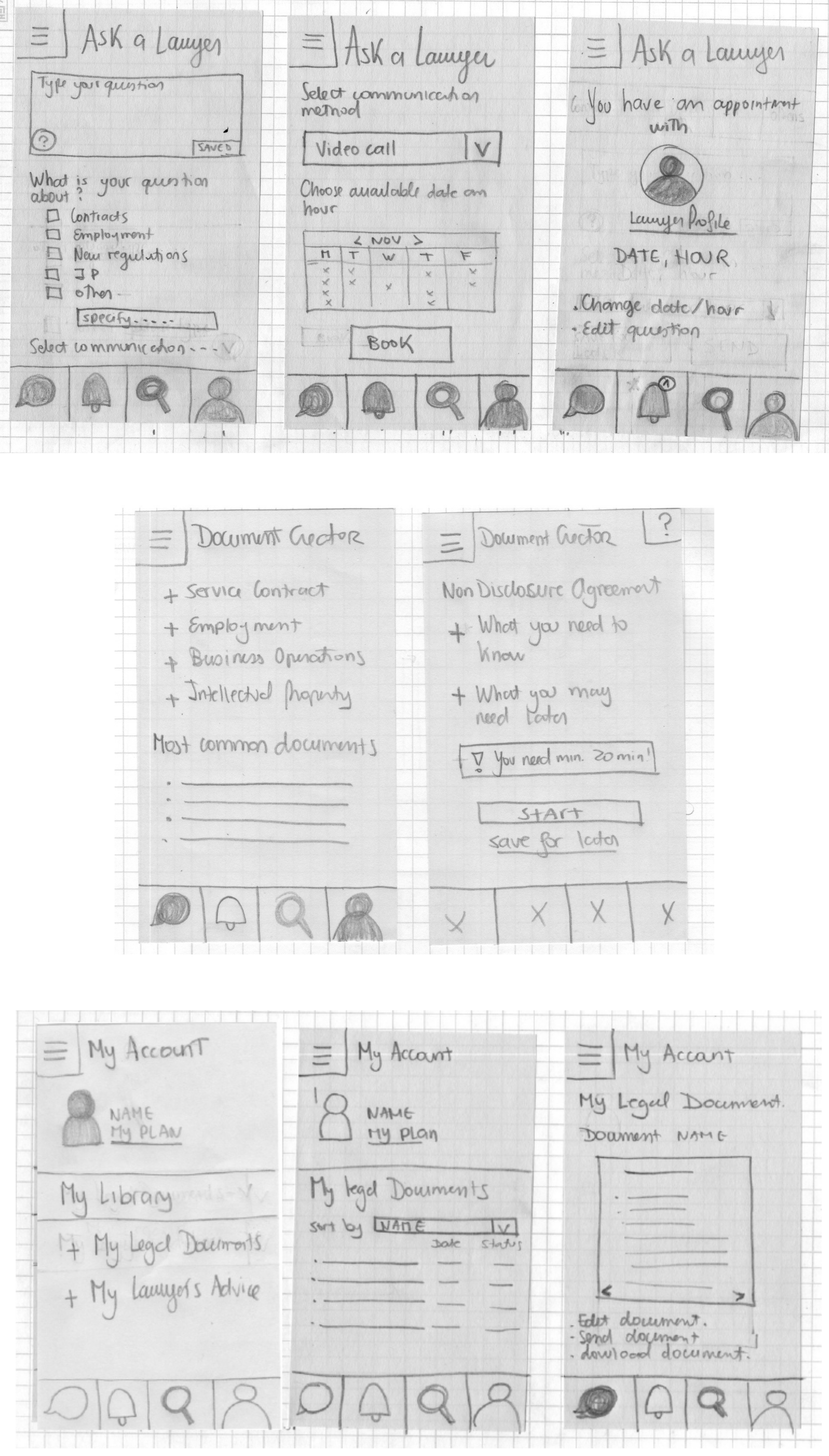
In response to the card sorting results, the site map was modified to align with user expectations of legal services. Categories were minimized, enhancing the application's navigability and user comprehension. Based on these changes, low-cost paper prototypes were developed and later refined into medium-fidelity prototypes that were later subjected to usability testing.
Low-Fid Prototypes
Mid-Fid Prototypes
Testing Solutions

The mid-fidelity prototype created in Figma was thoroughly tested to understand user interactions and perceptions of the web application.
6 users performed 4 tasks:
- Scheduling an appointment with a lawyer
- Drafting an agreement
- Retrieving legal docs
- Checking lawyer's response
The Methodology
Moderated face-to-face tests with 2 Ecuadorian residents in Germany, and remote tests with 4 entrepreneurs in Ecuador.
Target Audience
Entrepreneurs aged 25-54 in Ecuador, representing a significant portion of the entrepreneurial demographic (source).
Research Environment
Remote testing was conducted via screen sharing in Microsoft Teams or Google Meetings. In-person testing was audio-recorded at the user's home.
The Results Summary
The usability tests yielded insights across three key areas:
Usability Problems
Data was organized using an Affinity Map and a Rainbow spreadsheet for visual analysis.
General Comments
👍🏼 Users valued the swift scheduling of meetings, ease of form filling, pre-document verification, lawyer profile visibility, search bar functionality, and flexible meeting time selection.
⚠️ However, the usability test revealed critical areas for improvement in design, feature visibility, and user onboarding. Clear communication options are crucial for enhancing user satisfaction and trust.
Report of Errors and Recommendations:
- Identified issues include difficulties in locating the document creation feature, finding created documents, and accessing lawyer responses, particularly the "ask a lawyer" feature.
- There is a need to enhance the differentiation of the profile section, improve document list clarity, and increase the visibility of direct lawyer contact, as users often confuse the profile section with the home page.
- Provide clearer indicators of document readiness, verify authenticity, and clarify meeting types, as users were uncertain when a legal document was ready for use.
- Recommendations include renaming features, improving onboarding, and clarifying icons. Adding a progress bar could help with lawyer contact, and specifying platforms (e.g., Microsoft or Google Meetings) can reduce meeting confusion.
Affinity Map

Another Persona Emerged
Two user categories emerged: financially privileged entrepreneurs who value app elegance and lower-income users focused on affordability and ease of use.

Based on the goal of this project, feedback from the target persona of entrepreneurs in need of affordable legal advice will be prioritized.
The Need to Alleviate Legal Service Concerns
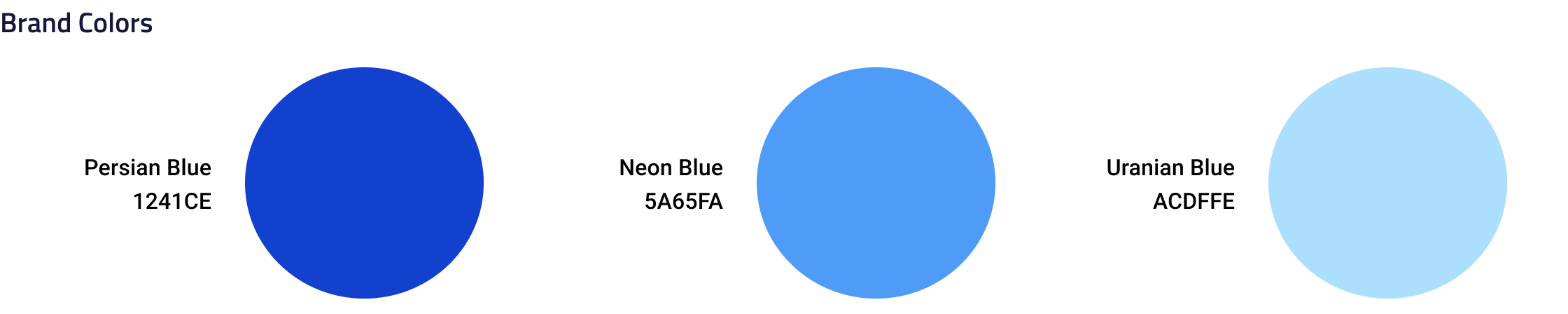
During the usability tests, users expressed concerns about the cost and complexity of legal services. Recognizing the need to create a calming and reassuring app environment, research was done on colors that evoke calmness. Blue and green were identified as suitable choices for the legal app due to their calming properties.

A color preference test was conducted to decide between the two, resulting in a strong preference for blue, with 83% of participants favoring it over green. Blue was thus selected for the app's design, supported by user feedback highlighting blue as a classic and trustworthy color.
Results and Learnings: Refining and Improving Design Solutions
The Untangled app design evolved through collaboration, incorporating feedback from UX peers and following Gestalt and Material Design principles for high-fidelity wireframes. It features a consistent layout with a calming blue color scheme, with ongoing efforts to improve accessibility. I used warm, non-judgmental language to create a supportive environment for users engaging with legal matters.
Additionally, I decided to use professional photos of lawyers smiling against a white background to enhance the welcoming and authoritative atmosphere, making it easier for users to engage with legal matters.

Mobile App Evolution
The app has transformed significantly since its inception. Initially, users were puzzled by the home screen's purpose, but now, a newsletter highlighting legal updates boosts engagement and support for inquiries. Introducing features like a regulatory change newsletter has shaped the app's design. Despite UI enhancements, there's room for improvement.
- Onboarding: The initial confusion has been addressed by redesigning the onboarding process, highlighting four main functions: Ask a Lawyer, DocsCreator, Doc Access, and Legal Updates.
- Creating Legal Docs: Menu labels are simplified for easier navigation and understanding.
- Ask a Lawyer: Enhancements include progress notifications and a network of realiable lawyers.
- Access to app features: Navigation is improved by separating "Documents Created" and "Lawyer Answers."
Distinctive Market Position
Untangled differentiates itself by catering specifically to Ecuadorian entrepreneurs, acknowledging the unique challenges of the local regulatory environment. Its design prioritizes affordability and reliability in legal services, including a section for regulatory updates which is vital in dynamic legal contexts.
Enhancement Opportunities
- Incorporating AI to streamline form filling and enhance user interaction.
- Adding features for users to provide business-specific details, offering tailored legal advice and efficiency for lawyers.
- While targeting cost-conscious entrepreneurs, there's potential to attract affluent users seeking a sophisticated user experience.
- Continuing to emphasize trust and tranquility in design, crucial for users concerned with legal costs.
- Partnering with more legal professionals to provide a wider range of services and pricing, adding value to the app.
- Despite key features are established, yet "DocCreator" and Chatbot functionalities require further development for enhanced performance.
Challenges and Tools
- Usability Testing: Conducting tests solo was challenging. More extensive testing, especially in person with an assistant, could capture more nuanced feedback.
- Legal Insights: Time constraints limited collaboration with legal professionals, an aspect that could greatly enrich the app's offerings.
- Time Constraints: Additional time was required for the complete development of the DocsCreator feature, for more complex documentation.
Future Analyses
Ongoing evaluations are crucial for aligning with business objectives and maintaining pricing accessibility. Regular user assessments focusing on UI testing, A/B testing, accessibility, and additional usability testing are a must to ensure the app meets user expectations and needs.
Separate analyses for different stakeholders such as lawyers and legal firms will help to tailor the service offerings to their requirements too.
